

Picture this. It’s Sunday night. You post next week’s schedule. Monday morning, three employees message you at once. One picked up night classes. Another can no longer work weekends. A third just went full-time and wants more shifts. Every update sounds reasonable. But if you push those new hours live without a checkpoint, you risk gaps in coverage, blown overtime budgets, and a payroll mess you’ll clean up for days.
This checkpoint authorizes a change in team availability. Like any good gatekeeper, it decides which changes are published to the live schedule. It is only appreciated when it works. If it does not, it is noticed by everyone.
This guide covers the how and why of the availability change approval process within the context of publishing new work hours. Lastly, this guide teaches you how to build a team availability approval process that is flexible enough to grow with your business.
What Is a Team Availability Change Approval?
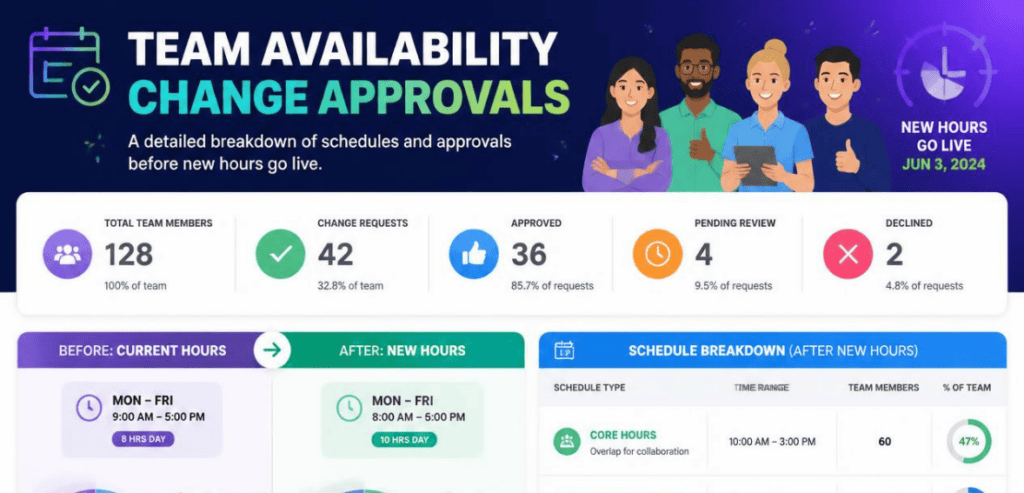
A team availability change approval is a review step. An employee submits a change to when they can work. A manager reviews it. Then the manager approves or declines it before the change affects any real shifts.
Weekly availability means a person has expressed when they are willing to work. It doesn’t mean a person has necessarily agreed to work a given shift during that time. An employee may be available to work every day for the week, but may not want to work all the days that week. Approving availability means they can be slotted during that time frame. You later decide what hours to slot them.
Availability drives shift assignment in the system. Approving availability means ensuring the source-of-truth data remains current. Assigning shifts during stale availability means you’ve signed someone up to not show for work.
Why Team Availability Change Approval Matters Before New Hours Go Live
Skipping reviews may feel like a time saver, but that is rarely the case. Here are the benefits a review step provides.
For starters, we have coverage. Approval of a change is preceded by the evaluation of the change’s effect on coverage. Proactively addressing the Tuesday gap is possible. With the review step, the coverage gap is addressed rather than the customer waiting at a vacant service counter.
The next benefit is payroll accuracy. Approved changes flow into time worked and time and attendance systems without the data being entered manually. This decreases the number of disputes and spreadsheet reconciliation, and data integrity issues that used to happen at the end of the pay period.
The third benefit is quiet compliance. A review step allows the assessment of rest periods, overtime limitations, legal qualifications, and other compliance requirements prior to a change being made. The cost to address a breach is much less than the cost to comply after the fact.
The last benefit is improved team morale. Individuals are more inclined to keep their calendars up to date if they perceive that their schedule requests are being considered. Ignoring a request that has been approved is a perception of a broken system.
How a Team Availability Approval Workflow Works
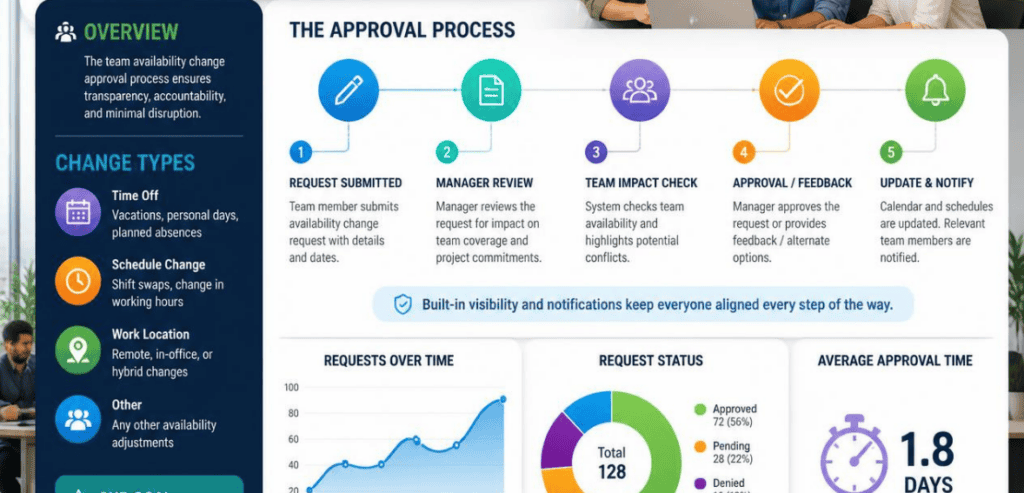
A strong team availability approval workflow moves through a predictable path. Understanding that path is the first step to fixing yours.
Thoughtful leave management systems enable employees to submit leave requests via an app that manages availability automatically. Requests are submitted, routed to the proper shift manager for approval, and the system offers a friendly user interface that arms managers with important trade-off context needed for effective coverage and scheduling.
A good system provides visibility to the approver as to the impact of the request. Leave approval systems should aid a manager in determining if the request causes a coverage issue and could cause overtime for other employees. A quality system allows a manager to review the request and the impact of the decision without the manager having to guess.
When a manager makes an approval or a denial, the system logs the time and justification. The information is a valuable resource during an audit, and often helps identify scheduling patterns.
Lastly, the effective date synchronizes the request with the system. Approved requests become available to the scheduling system on the date the employee requested instead of being administratively timed. Very few systems implement this, and as a result, employees can lose hours of requested time, particularly if the posted schedule was public.
Building a Team Availability Approval Workflow That Scales
A workflow that works for ten people can crumble at a hundred. Here’s how to design one that holds up as you grow.
Set Clear Submission Deadlines and Notice Rules
Give your team a heads-up for when you need changes. If you set a ‘rule’ like, “availability changes for next month will be due by the 20th,” it gets people thinking about your coverage and gives you a chance to balance everything on your own. Have the rule codified and documented early on. Anticipate exceptions. No one should have to dramatically reschedule their availability due to a doctor’s appointment or family issue.
Route Requests to the Right Approver
Relying on one approver is a bottleneck, not a workflow. If a single person’s inbox determines whether the schedule moves, work stalls the moment they’re on vacation. Build in an escalation path and a backup approver. Automated routing that sends each request to the correct manager and reminders that nudge stalled requests keep things moving without constant chasing.
Check Coverage and Compliance Before You Approve
Make checks and balances part of the decision, and don’t leave the cleanup as an afterthought. Confirm that the change doesn’t leave a shift uncovered. Verify that rest periods are observed between closing and opening shifts. Be alert to overtime. Make sure all personnel eligible for the role have the proper certification. This will make compliance easier and more efficient.
Lock In an Effective Date
This is the step that ties everything to the headline: approvals before new hours go live. Approving a change is not the same as activating it. Attach an effective date to every approved change so it applies on the right day. That way you can approve a batch of updates now and let them take hold cleanly at the start of the next scheduling period, without disturbing shifts you’ve already published.
Compliance: Predictive Scheduling and Fair Workweek Laws

For U.S. employers, availability approvals aren’t only an operations question. They’re a legal one.
There are laws called Fair Workweek laws, also known as predictive scheduling laws. Employers must post schedules two weeks in advance. Employers also have to pay a premium if something in the posted schedule changes. As of 2026, the only state with a predictive scheduling law is Oregon. Major metropolitan cities, such as New York City, Chicago, Seattle, and Los Angeles, also have ordinances. Not complying with these laws can result in hefty consequences. This underscores the importance of having an approval trail. According to the Society for Human Resource Management, predictive scheduling laws improve schedule predictability for workers.
Record-keeping is important too. The Fair Labor Standards Act (FLSA) requires employers to keep accurate records of hours worked and other related data. Basic information regarding FLSA requirements can be found on the U.S. Department of Labor’s Wage and Hour Division page. Having an availability approval workflow that logs each availability request, approval, and effective date will give you the audit trail that these rules are looking for.
Because the laws are unique to a city and an industry and can also be rapidly changing, always double-check the laws that are applicable to your locations.
Scheduling Tools That Support Availability Approvals
You can run approvals on paper. You’ll outgrow it quickly. Purpose-built platforms turn a manual chore into a routed, logged, mobile process. Here are three examples, described at a high level, since features change over time.
Shyft
Shyft has products that can improve deskless industries with features geared towards custom team communication and scheduling. Shyft’s approval system builds logic that automatically approves requests that meet certain conditions and allows managers to focus on the exceptions. Shyft’s approval system also focuses on compliance by identifying scheduling issues before the final schedule is shared instead of after. Shyft addresses violations involving breaks, hour restrictions, and qualifying issues.
Connecteam
Connecteam is an all-in-one employee app that packages scheduling alongside communication and time tracking. Its guidance leans into fair, efficient handling of schedule change requests, helping managers balance business needs with employee flexibility while keeping a clear process. That structure is useful for teams that want availability changes and time-off requests living in one place.
Workforce.com
Workforce.com integrates scheduling and attendance and keeps up with labor laws across all jurisdictions. This program allows managers to develop an approval-based system where they control the rules for scheduling and dictate whether shift trades require approval. This system integrates built-in compliance. It is a good solution for multi-site organizations trying to manage the implications of predictive scheduling laws.
Common Mistakes to Avoid
A few small mistakes can compromise the most carefully crafted systems. Approving work without ensuring sufficient coverage is the biggest mistake, because in that case a yes vote is actually a no vote. Letting approvals pile up unresolved is also problematic, since work that is held up in a queue and is not completed by the deadline results in a blockage, not oversight. Also, if you fail to set an effective date, work can be published before it is ready. Finally, making the process to submit work time-consuming and burdensome will likely result in either no updates being submitted or incomplete updates being submitted; and, of course, this is exactly what you want to avoid.
Conclusion
Team availability change approvals are small in effort and large in impact. That single review step, done before new hours go live, protects your coverage, keeps payroll clean, and builds the compliance trail US labor rules increasingly demand. The payoff isn’t just fewer fires to put out. It’s a team that trusts the schedule because the schedule reflects what they actually told you.
Start simple. Set clear deadlines, route requests to the right approver, check coverage and compliance before you say yes, and lock in an effective date every time. Add software when the manual version strains. A well-run team availability approval workflow doesn’t slow you down. It’s the difference between a schedule that holds and one that unravels the moment real life gets in the way.
Frequently Asked Questions (FAQs)
What is the difference between availability and a shift request?
Availability defines the days and times an employee is open and eligible to be scheduled. A shift request asks for or changes a specific assigned shift. Approving availability confirms the window; you still assign the actual hours within it.
Why approve availability changes before new hours go live instead of after?
Approving first lets you see the coverage, overtime, and compliance impact while it’s still fixable. Approving after the schedule is posted means catching problems too late, often after payroll has already processed the wrong hours.
How far in advance should employees submit availability changes?
Set a clear, documented deadline that fits your scheduling cycle, such as two weeks before the next period. In cities with Fair Workweek rules, advance notice requirements and change premiums may also apply, so align your deadline with the local ordinance.
Do I need scheduling software to run an approval workflow?
No, but it helps at scale. Software automates routing, logs every decision with a timestamp, surfaces coverage and compliance impact, and applies changes on their effective date. For small teams, a shared calendar can work; for larger or multi-location teams, a dedicated tool prevents bottlenecks and errors.