
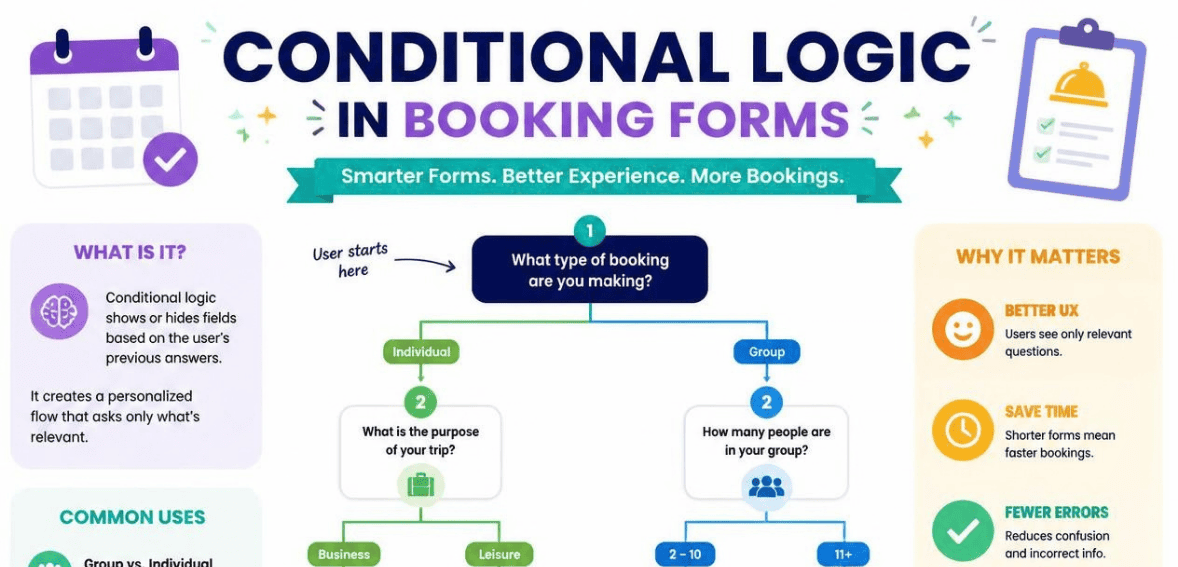
Picture a customer landing on your booking page. They want a haircut. Instead, they face a wall of fields asking about oil changes, group sizes, and dietary needs. Confused, they leave. You just lost a sale.
More business owners should understand that the following happens quite often. Research shows that the vast majority of online users abandon online forms. This can also be attributed to forms that are long and contain irrelevant questions. The answer is much smarter than simply shortening the form for everyone. The solution is booking form conditional logic.
With booking form conditional logic, your form can be made to think. This allows the right questions to be seen by the right users at the right time. Up next, you will find out exactly what booking form conditional logic is and when you should use it, in addition to how to set it up yourself without a developer.
What Is Booking Form Conditional Logic?
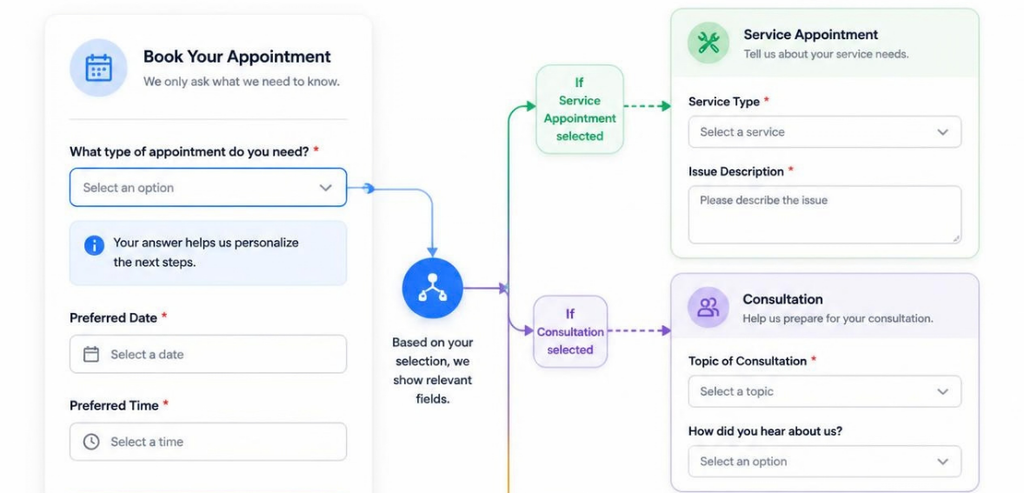
Conditional logic is a simple rule that changes your form based on how someone answers. A trigger field is checked against a condition. Then an action runs.
Think of it as a reaction chain. An option is selected. The responsive form can show a new field, hide elements, skip to a different page, make a field mandatory, or direct the booking to a specific calendar or contact person.
Here is a practical scenario. A dental office form opens with a field for the type of appointment. When the visitor selects “routine cleaning,” the form fills with openings for the next several weeks. When “emergency consultation” is selected, the same form shows openings for that day. Same form, different routes.
This is the basic principle of booking form conditional logic. The form changes based on the user input, ensuring that the user is not answering questions that are irrelevant to them.
This is strongly influenced by user experience design. This is based on the principle of progressive disclosure, which was made popular by usability guru Jakob Nielsen. The core idea is to limit the response options to only what is necessary. This helps narrow the focus and reduces the cognitive load to complete the action.
Why Booking Form Conditional Logic Matters
A booking form is often the last step between interest and revenue. Every extra field is a chance for someone to give up. Conditional logic protects that moment.
The evidence supports this. On major form platforms, studies show that removal of unrelated questions leads to increased completion rates of 20-40%. In one popular study, removing 7 fields from an 11-field form increased completion rates by a staggering 120%. The more fields a form has, the lower the completion rate. Fewer is better; that’s the consistent pattern that has emerged.
With Conditional Logic, forms can be designed with fewer questions, while still allowing the collection of the necessary data. Forms designed with fewer questions, or “the long scary form,” can be avoided in lieu of a more generic form, or the “weak information” collection form. The deep questions can be directed to the relevant users, while the core questions can be designed in a way to be directed to all users.
Even Psychological principles support this theory. A form that is overloaded with unrelated questions gives the user the feeling of a long and tedious process; this is not the case. The perceived length of the form is actually decreased by removing unrelated questions. The form can give the user the feeling of a shorter process.
The quality of the data collected also increases. Questions related to a group event can be seen only by the group, while a solo customer never sees the group-related questions. The result is organized and relevant data.
When to Use Conditional Logic in Booking Forms
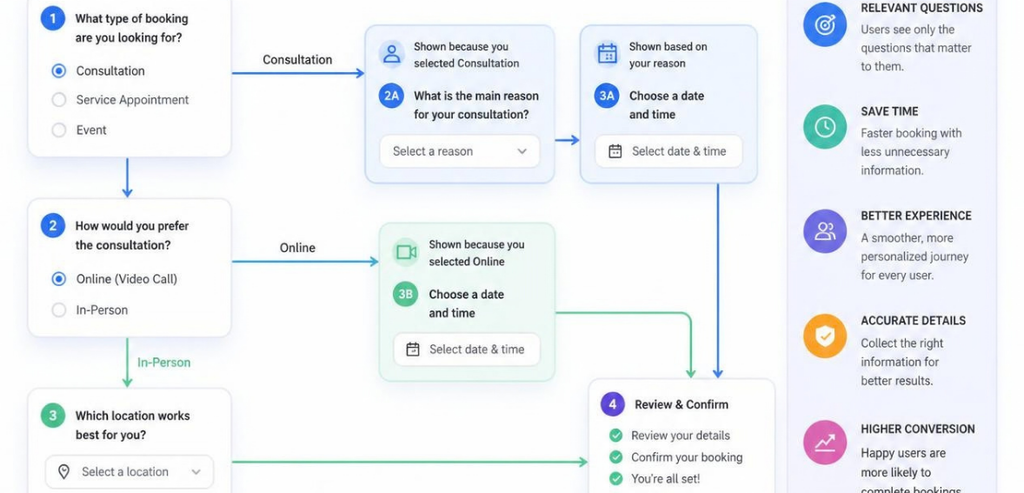
Not every form needs branching. A simple one-service booking with three fields is fine as is. Conditional logic earns its place when your bookings vary by customer type, service, or intent. Here are the situations where it shines most.
Service-Based Businesses
All service businesses must stay relevant in the marketplace. A good example is the spa. When a client picks a massage, the system can show them which therapists and which rooms are available. If a client picks a facial, the system can show them skincare specialists and the add-ons for the treatment. The client only sees options that are relevant to them.
That example can be extended to salons, auto shops, tutors, cleaning services, and home repair services. You just need to ask which service they need. The system can then customize all of the subsequent questions. It’s not a form anymore. It’s like a receptionist that has all the knowledge, walking them through the process.
Healthcare and Appointment Scheduling
Healthcare scheduling is a strong fit for booking form conditional logic. Clinics juggle many appointment types, providers, and urgency levels. Branching helps route patients correctly and keeps staffing predictable.
Beyond convenience, this reduces frustration. Patients see only the services and time slots relevant to their need. A new patient intake can trigger extra fields for insurance and history, while a returning patient skips straight to a quick rebooking. That tailored flow also supports cleaner records, which matters a great deal in a regulated field.
Lead Qualification and Sales Calls
With B2B services and high-ticket offerings, conditional logic can qualify leads. Just one question on company size or budget delivers different paths for different answers. Large enterprise leads can be routed to a senior salesperson. Smaller leads can be directed to either a self-serve option or a short introductory call.
This allows the use of a single booking page for multiple segments, eliminating the need to create different booking page URLs for each campaign. Best of all, strong leads go straight to a booking and poor leads are directed away to avoid wasting valuable time. Your sales team can focus their time on the best opportunities.
How to Set Up Booking Form Conditional Logic
You do not need to code to build a smart booking form. Most modern builders offer a visual editor. The setup follows a clear rhythm no matter which tool you pick.
With custom forms, you need to plan your approach logically before using the builder. This should be done outside of the builder. Write down your ideas or sketch a basic outline. Formulate the initial question, possible answers, and the corresponding expected outcomes for each possible answer. This should save you considerable time in the long run.
Build the base form adding fields common to everyone first. Then, add the fields, pages, or booking calendars that will be visible to certain people. After that, open the conditional logic settings of the specific field or module. You will need to set up a trigger and, select the condition, such as “equals” or “contains”, and the action you want to set (for example, to show, hide or redirect).
After that is done, test the conditional logic paths and provide all the possible combinations that correspond to each answer. Act as if you are the end user. Do not skip doing this as most mistakes occur during this testing phase. Finally, publish the form and check your analytics. Where your users drop off, refine the paths. The form’s logic may be correct, but small adjustments will produce significant gains in the logic paths.
Popular Tools for Booking Form Conditional Logic
Several platforms handle branching well. The right one depends on your website, your budget, and how complex your bookings are. Here are three widely used options.
Jotform
With a large repository of templates, Jotform is a no-code form builder that is flexible in design. Its conditional logic lets field editing and submission routing occur based on user input. Jotform is not exclusively a scheduling application, though it can be adapted to manage nearly any booking situation. Because of this versatility, appointment fields, multi-page forms, and payment integrations can all be used on Jotform. Additionally, Jotform has compliant plans for healthcare providers, making it popular for clinics.
Gravity Forms with Simply Schedule Appointments
For WordPress sites, the pairing of Gravity Forms and Simply Schedule Appointments is a proven combination. Gravity Forms provides the branching engine, while Simply Schedule Appointments adds real booking calendars. Together, they let you display specific calendars or fields depending on earlier choices. A visitor can be guided to the correct department, provider, or add-on based on what they selected first. Setup involves adding each appointment type to the form, then enabling conditional logic on those appointment modules.
Typeform and Calendly
Some teams like to separate parts of intake and scheduling. For the intake part, conversational form applications like Typeform only ask one question at a time and handle conditional logic. Typeform then hands the scheduling part off to a dedicated scheduling application like Calendly.
Best Practices for Smart Booking Forms
A few habits separate forms that convert from forms that frustrate. Keep your questions to a minimum first, then add branching only where it earns its keep. Every field you introduce raises the odds of abandonment, so branching should trim the experience, not bloat it.
Each journey should be kept concise and directed. Phrase your main question. Indicate the subsequent relevant step. Prompt the customer to book. Use direct and clear button copy. “Submit” is too vague. And prioritize mobile design, since a lot of bookings will happen on mobile devices during customers’ free time.
Let the data speak for you. Implement a way to observe where the customers drop off. Redesign branches that lose customers. Single-page bookings tend to be less effective compared to a multi-page booking that has a guided progress indicator. Think of your booking form as an active feature that needs to be maintained.
Common Mistakes to Avoid
The biggest danger is over-engineering. Some builders develop very complex systems that resemble a tree with many branches. Most people can’t follow them, including the builders. Complexity is not the same as sophistication. If constructing a path is difficult and confusing, so will the path be for the customer when they try to use it.
Another mistake is testing only on simulators. For example, one rule may work perfectly on a desktop and may fail to work or be recognized on a mobile device. Not testing exposes things like fields that are defined but never get displayed, and fields that are defined but prevent form submission with no error or explanation. You need to walk every defined path to be certain it works before going live.
Conclusion
Booking form conditional logic turns a static, one-size-fits-all form into a responsive guide. It shows each visitor only what matters to them. That reduces friction, cuts abandonment, and delivers cleaner data you can actually use.
The strategy is simple at its heart. Ask the essential questions first. Reveal the rest only when it becomes relevant. Route people to the right calendar, service, or team member based on their answers. Whether you run a spa, a clinic, or a sales team, this approach helps more visitors reach the finish line and click “book.”
Start small. Map one branching path for your most common booking scenario. Test it, measure it, and expand from there. A smarter booking form is one of the highest-leverage upgrades you can make to your scheduling process.
Frequently Asked Questions
What is conditional logic in a booking form?
Conditional logic is a rule that changes your booking form based on how someone answers a question. When a visitor picks an option, the form reacts by showing a field, hiding a section, jumping to a page, or routing the booking to a specific calendar. The result is a form that adapts to each person instead of showing everyone the same thing.
Does conditional logic really improve booking conversions?
Yes, in most cases. Removing irrelevant questions has been shown to lift form completion rates significantly, and shorter, more focused forms consistently convert better. Conditional logic lets you keep forms short for each visitor while still collecting the detailed data you need. The key is to test your paths and watch where people drop off.
Do I need coding skills to set up booking form conditional logic?
No. Most modern form builders, including Jotform and Gravity Forms, offer a visual editor. You choose a trigger, set a condition, and pick an action from simple dropdowns and toggles. Mapping your logic on paper first makes the whole process faster and far less error-prone.
When should I not use conditional logic?
Skip it when your booking is genuinely simple. If you offer one service with only a few fields, branching adds complexity without benefit. Conditional logic pays off when bookings vary by service type, customer segment, urgency, or intent. Match the tool to the actual complexity of your scheduling needs.